Keyboard and focus checker
Finds controls people can't reach by keyboard, controls a keyboard reaches but nobody can see, focus styles that were removed, and focused elements hidden behind sticky headers.
What this check looks for
The audit runs this check with every other check, on the page as the browser renders it.
- Clickable elements that are not controls
- Divs and spans with click handlers that a keyboard can't reach or activate.
- Removed focus styles
- outline:none and similar rules that leave no visible focus indicator.
- Focus hidden by fixed content
- Sticky headers and banners that can cover the focused element.
- Positive tabindex
- tabindex values above 0 that break the natural tab order.
- Controls hidden with opacity 0
- Buttons and links in a faded-out lightbox or menu that a keyboard still reaches, measured in the rendered page.
What a failure looks like
A menu toggle is a div with a click handler. Keyboard users can't reach it, so the navigation never opens for them.
<!-- Broken: not focusable, no keyboard activation -->
<div class="menu-toggle" onclick="openMenu()">Menu</div><!-- Fixed: a real button gets focus, Enter and Space for free -->
<button type="button" class="menu-toggle" aria-expanded="false" aria-controls="site-menu">Menu</button>How it shows in AccessGuard
Each finding names the WCAG criterion, explains the problem in plain words and shows the element that fails, so a developer can find it on the page.
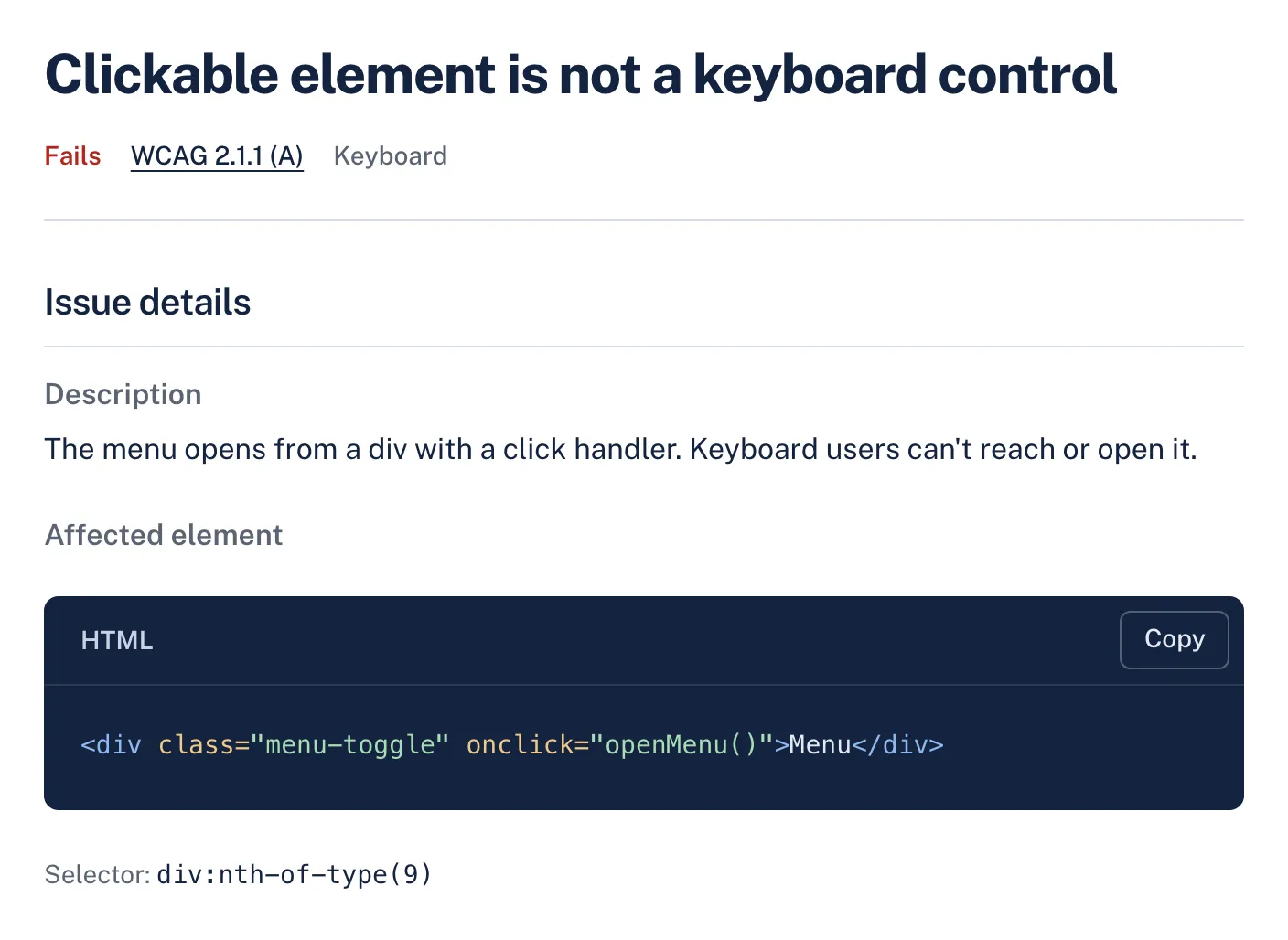
WCAG criteria
Findings from this check name one of these criteria. How much of each the audit can decide on its own:
| Criterion | Level | Automation |
|---|---|---|
| 2.1.1 Keyboard Clickable elements that are not keyboard controls are flagged. Using every feature by keyboard needs a person. | A | Partly automated |
| 2.1.2 No Keyboard Trap | A | Needs a person |
| 2.4.3 Focus Order | A | Needs a person |
| 2.4.7 Focus Visible | AA | Partly automated |
| 2.4.11 Focus Not Obscured (Minimum) | AA | Partly automated |
What still needs a person
No automated tool can confirm these. AccessGuard marks related findings as Review, so nobody mistakes them for a pass.
- Tabbing through the whole page to confirm the focus order makes sense.
- Checking that focus never gets stuck inside a widget (a keyboard trap).
- Using menus, dialogs and forms end to end with only a keyboard.
Questions
Can keyboard accessibility be tested automatically?
Partly. The audit finds common causes, such as click handlers on non-interactive elements and removed focus styles. Moving through the page with a keyboard is still the only way to confirm focus order and that nothing traps focus.
Is outline:none always a failure?
Only when nothing else shows where focus is. A custom focus style with enough contrast is fine, and often looks better than the browser default.
What is WCAG 2.4.11?
A criterion new in WCAG 2.2. When an element receives keyboard focus it must not be entirely hidden by other content, such as a sticky header or cookie banner.
Related checks and guides
-
Checks
ARIA checkerA page's URL in, every ARIA problem out, with the element and what is wrong with it.
-
Target size checker
A page's URL in, every button and link too small to tap out, measured in a browser against the WCAG 2.2 minimum of 24 by 24 pixels.
-
Headings and landmarks checker
A page's URL in, its heading outline and landmarks out, with what is wrong in them.
-
Guides
Keyboard Navigation Accessibility: A Complete WCAG GuideMany people navigate the web without a mouse. Learn how to build keyboard-accessible websites with proper focus management, tab order, skip links, and visible focus indicators.
-
How to Build an Accessible Modal Dialog, with Code to Copy
What a dialog has to do when it opens, while it is open and when it closes, with the WCAG criterion behind each requirement.
-
WCAG 2.2 vs 2.1: What Changed and What to Re-Test
WCAG 2.2 keeps every 2.1 criterion but one, adds six at Level AA and leaves color contrast alone, so here is exactly what to re-test.
-
Button vs Link Accessibility: The Choice That Breaks Keyboards
Links go somewhere and buttons do something, and picking the wrong one quietly locks keyboard and screen reader users out.
-
Accessible Navigation Menus and Dropdowns That Work
Site navigation is a disclosure pattern, not an ARIA menu, and choosing it fixes most keyboard and screen reader bugs in one go.
-
WCAG 2.2 Checklist: Every Level A and AA Criterion
All 55 Level A and AA success criteria in plain words, how to check each one, and which ones a scan can see and which need a person.
-
How to Test With a Screen Reader: A 20 Minute Website Pass
The smallest screen reader routine that finds real bugs: one reader, a handful of keys and a pass of about 20 minutes per page template.
-
Lighthouse Accessibility Score: Why 100 Is Not an Audit
What the score measures, the checks Google itself leaves out of it, and what to say when someone points at the green circle.
-
Form Accessibility Audit: 7 Mistakes to Check For
How to spot the seven most frequent form failures in an existing form, which WCAG criterion each one fails, and the fix.
Every check, not only keyboard and focus
The free audit runs this check and every other one. Results in about a minute.