Accessibility audits and monitoring for the Shopify stores you build
Audit your clients' storefront pages against WCAG 2.2 AA, send each store owner a report under your agency's name, and get an alert when a theme update or a new app breaks something.
Why store owners are asking
Checked against the sources below on 13 September 2026. General information, not legal advice.
- Stores face most lawsuits
- UsableNet counted 79% of US digital accessibility lawsuits in the first half of 2026 against e-commerce businesses, up from 70% in 2025.
- A third named Shopify stores
- In EcomBack's 2025 data, 1,318 of 3,948 ADA website lawsuits, about a third, targeted Shopify sites.
- Widgets didn't prevent them
- EcomBack found that about 1 in 4 of those lawsuits named a site that already had an accessibility widget installed.
- Europe applies too
- Since 28 June 2025 the European Accessibility Act has covered online stores selling to consumers in the EU, with an exemption for microenterprises providing services.
What often fails on Shopify storefronts
Themes, apps and store content each add their own problems. These are failures the free audit checks for on home, collection and product pages.
| What fails | Check |
|---|---|
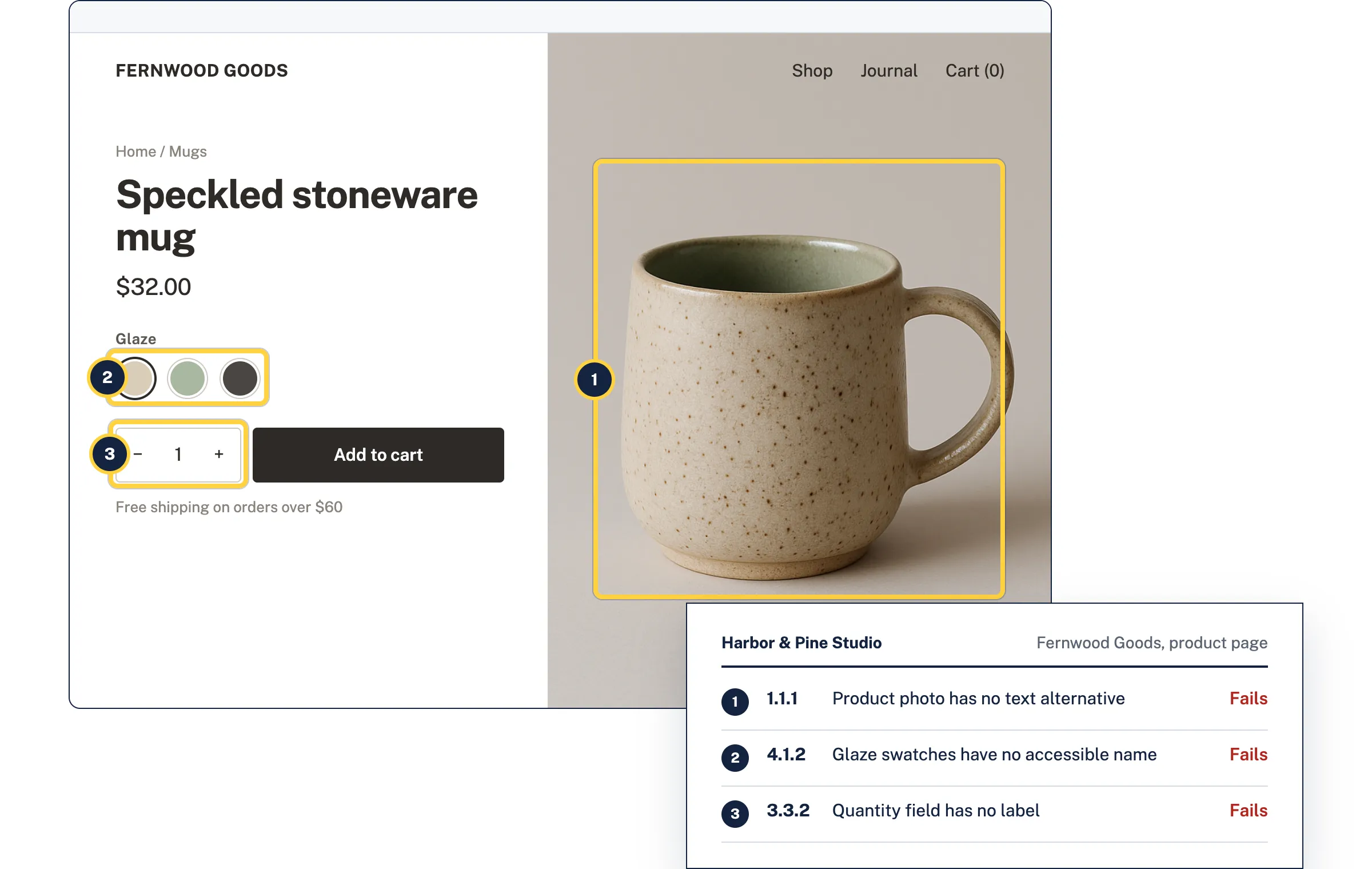
| Product images without alt text Alt text is written for each product image in the Shopify admin, so it goes missing as new products are added. | Alt text checker |
| Colour and size swatches without names A row of coloured circles tells a screen reader user nothing unless each option has an accessible name. | ARIA checker |
| Quantity and newsletter fields without labels Placeholder text and plus and minus buttons don't say what a field is for. | Form labels checker |
| Low-contrast sale badges, prices and buttons Pale brand colours often fall below the 4.5:1 contrast ratio WCAG sets for text. | Color contrast checker |
| Slideshows, cart drawers and popups Slide-out carts and popups that trap or lose keyboard focus stop people before they reach checkout. | Keyboard and focus checker |
| Small tap targets Swatches, slideshow dots and filter buttons smaller than 24 by 24 pixels are hard to hit on a phone. | Target size checker |
Which store pages to monitor
Add the pages a shopper passes through. Monitoring rescans them daily, weekly or monthly and alerts you when something new fails, for example after a theme update or a new app.
Monitoring is monthly on the free plan, at no cost, and up to daily on paid plans, where a scheduled rescan uses 1 credit for every 10 pages. See pricing
- Home page
- Slideshows, featured collections and the newsletter signup.
- A collection page
- Filters, sort menus, product cards and sale badges.
- A product page
- Product images, variant swatches, quantity and add to cart.
- Search and contact pages
- Search results, the search field and the contact form.
For Shopify Partners and store agencies
Add each client store as a site with its key pages. Send the store owner a PDF report under your agency's name that explains every failure in plain words, with the fix for developers behind it.
Apps can add code to a storefront and theme updates change its markup. Monitoring catches what a change broke before the store owner hears about it from a customer.
A Theme Store score isn't WCAG conformance
Shopify requires Theme Store themes to average a Lighthouse accessibility score of at least 90 on the home, collection and product pages. That is a useful floor, but automated scores cover only part of WCAG, and each store's content, apps and theme edits add failures the theme review never saw.
What an audit can't do
- It doesn't scan checkout. Shopify runs checkout, and only Shopify Plus stores can extend its main steps. Shopify publishes its own accessibility report for checkout.
- It can't scan a store behind Shopify's password page, so audits start once the storefront is public.
- It doesn't install an app or change a theme. Developers fix the theme code, and the report shows what to change.
- Only part of WCAG can be checked automatically, so some criteria need a person to review. No audit can prevent a lawsuit.
Questions
Is a Shopify theme accessible out of the box?
Themes in the Shopify Theme Store must average a Lighthouse accessibility score of at least 90 on their home, collection and product pages. That doesn't mean a store meets WCAG 2.2 AA, because product content, apps and theme edits add their own failures. An audit of the live pages shows where a store stands.
Do Shopify apps affect accessibility?
They can. Apps add code to the storefront, such as chat bubbles, popups and review widgets, and that code can fail WCAG even when the theme passes. Rescanning after installing or updating apps catches it.
Can AccessGuard check Shopify checkout?
No. Shopify runs checkout, and stores can only change it within the limits Shopify sets. Shopify publishes an accessibility conformance report for its checkout, which lists what it partially supports.
Does it work for Shopify Plus, headless stores or other platforms?
Yes. AccessGuard audits any public web page in a real browser, so it works the same for Shopify, Shopify Plus, headless storefronts, WooCommerce and other platforms.
Will an accessibility widget protect a store?
No. In EcomBack's 2025 data, about 1 in 4 ADA website lawsuits named a site that already had a widget installed. Fixing the theme and content is the durable approach.
How many store pages can I monitor?
Up to 10 on the free plan, rescanned monthly at no cost, and as many as you add on any paid plan. On a paid plan a scheduled rescan uses 1 credit for every 10 pages on a store, so weekly monitoring of 20 store pages uses about 9 credits a month.
Sources
- UsableNet, 2026 midyear digital accessibility lawsuit numbers
- UsableNet 2025 year-end digital accessibility lawsuit report (PDF)
- EcomBack 2025 annual ADA website accessibility lawsuit report
- Shopify Theme Store requirements
- Shopify checkout accessibility conformance report
- Shopify theme app extensions and app embeds
- Shopify password page
- Directive (EU) 2019/882, the European Accessibility Act
Related
- ADA and business websites
US businesses open to the public. There is no federal web standard under Title III, and WCAG is the usual benchmark.
- European Accessibility Act
EU law applying since 28 June 2025 to e-commerce, consumer banking, transport, e-books and communications services, with penalties set by each country.
- AccessGuard vs accessiBe
An overlay changes how a page behaves in the browser. An audit tells you what to fix in the site itself. Agencies that build and maintain client sites usually need the second.
- Alt text checker
Paste a page address. See every image on it with its alt text, and which ones need fixing.
- Form labels checker
Finds inputs without labels, placeholders used as the only label, and fields that don't say what they collect.
- Color contrast checker
Two colors in, the ratio out, and the nearest color that passes WCAG 2.2.
Audit a client's store page
Paste a product or collection page. Free, no account needed, results in about a minute.