Accessibility audits your clients can read.
A report under your agency's name that explains every failure in words a client can follow, with the fix your developers need behind it.
Free, no account needed. Results in about a minute.
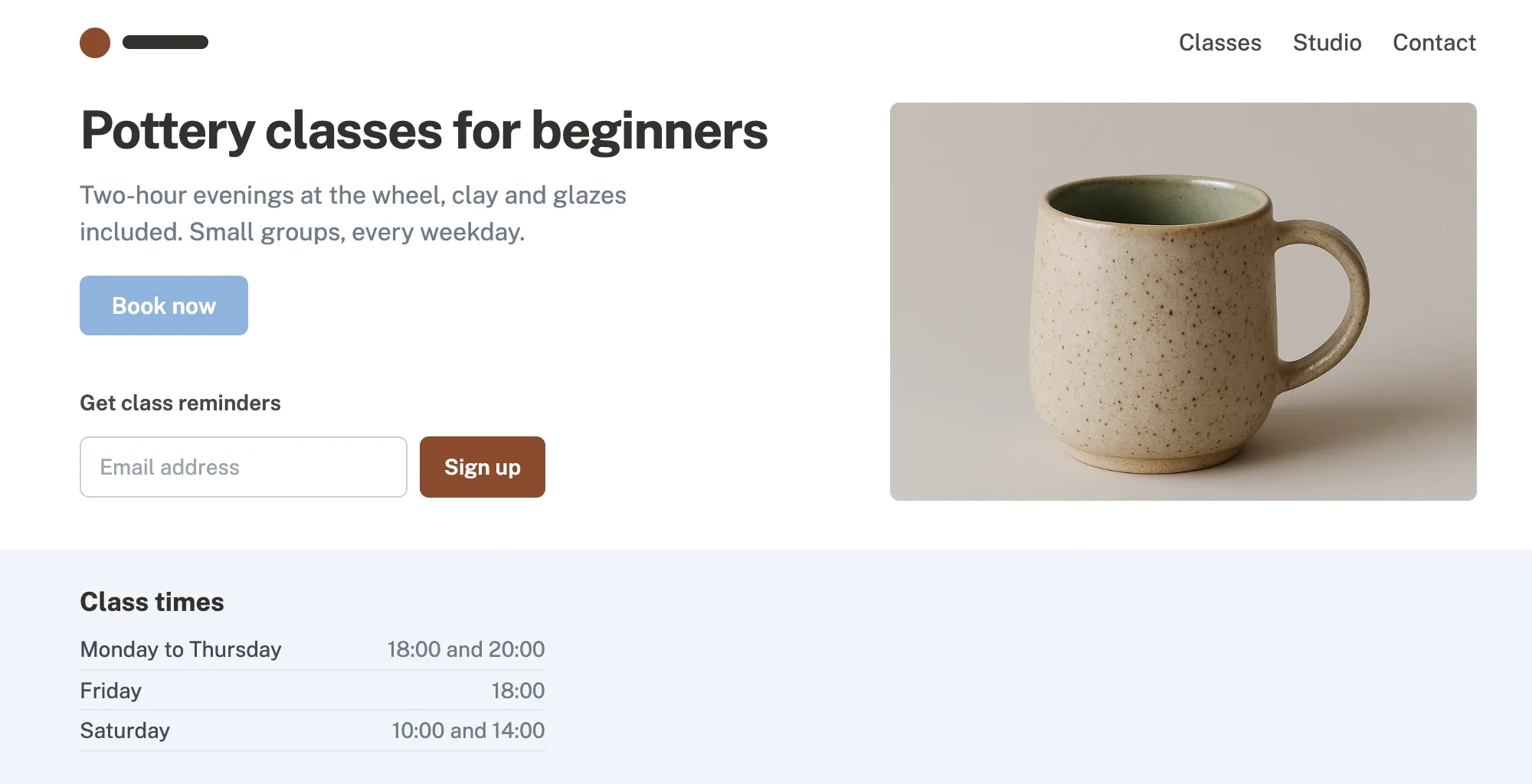
Button text is too faint WCAG 1.4.3
White on light blue has a contrast of 2.15:1. Text needs at least 4.5:1 to be readable for people with low vision.
Fix background: #1F3B6E; 2.15:1 → 11:1
Photo has no description WCAG 1.1.1
Screen reader users hear nothing for this image.
Fix alt="A speckled stoneware mug, glazed green inside"
Email field has no label WCAG 3.3.2
The field only has placeholder text, which disappears once someone starts typing and is not read as a name.
Fix <label for="email">Email address</label>
Grey text is too faint WCAG 1.4.3
Light grey on white has a contrast of 4.3:1, just under the 4.5:1 minimum.
Fix color: #525C66; 4.3:1 → 6.8:1
6 more in the report, each with its fix.
White-label reports
Your name on the report
The report your client opens carries your agency's name, and explains every failure in words they can follow.
- Your name on every page, not ours
- A score and what it means, for the client
- Each problem with its fix, for your developers
Harbor & Pine Studio · Prepared for Millbrook Pottery Studio 17 September 2026 · Page 1 of 3
Accessibility audit: Millbrook Pottery Studio
Automated WCAG 2.2 AA checks
72/100
3 up from 69 on 9 September
- 10 problems, in 17 places
- 3 probably fail
- 2 need a person to check
What happens next
- The 10 problems get fixed first. They stop some visitors from booking or reading.
- The 3 probable failures are checked by hand, then fixed the same way.
- The audit runs again once the fixes are live, with the new score.
Problems, fix first
-
1
Booking button text below 4.5:1 contrast "Book now" button
Fix
background: #1F3B6E; 2.15:1 → 11:1 -
2
Image without a text alternative Class photo
Fix
alt="A speckled stoneware mug, glazed green inside" -
3
Form field without a label Class reminders field
Fix
<label for="email">Email address</label> -
4
Text below 4.5:1 contrast Grey paragraph under the headline
Fix
color: #525C66; 4.3:1 → 6.8:1
6 more problems over the next two pages.
Monitoring
Every client site in one account
Rescan them on a schedule and see which sites got worse before your clients do. How monitoring works
| Client | Score | Failures | Change | Next rescan |
|---|---|---|---|---|
| Marlow Yoga Studio | 61 | 17 | 4 more | Tomorrow |
| Millbrook Pottery Studio | 72 | 10 | 3 fewer | Monday |
| Northgate Vets | 79 | 6 | No change | In 12 days |
| Fell & Sons Plumbing | 88 | 3 | 5 fewer | In 6 days |
| Quarry Street Bakery | 94 | 1 | No change | In 3 weeks |
For agencies
Built for client work
What changes when the site you audit is somebody else's.
- Findings your developers can ticket
- Each finding names the failing element and its fix. Export them as CSV for your issue tracker.
- The fix in your client's own code
- On paid plans AI writes the change for the element that fails, for a developer to review. AI fixes
- Your whole team on one account
- On Pro and Premium, invite the people who audit and the people who fix. Everyone on the account gets the monitoring alerts. See pricing
Run your first audit on a client site
Free, no account needed. The free plan covers 1 site of 10 pages, Pro 5 client sites and Premium unlimited.