Accessibility audits anyone can read.
Every failure marked on a picture of your page, with the fix beside it, in a report you can send to your team, your manager or your client.
Free, no account needed. Results in about a minute.
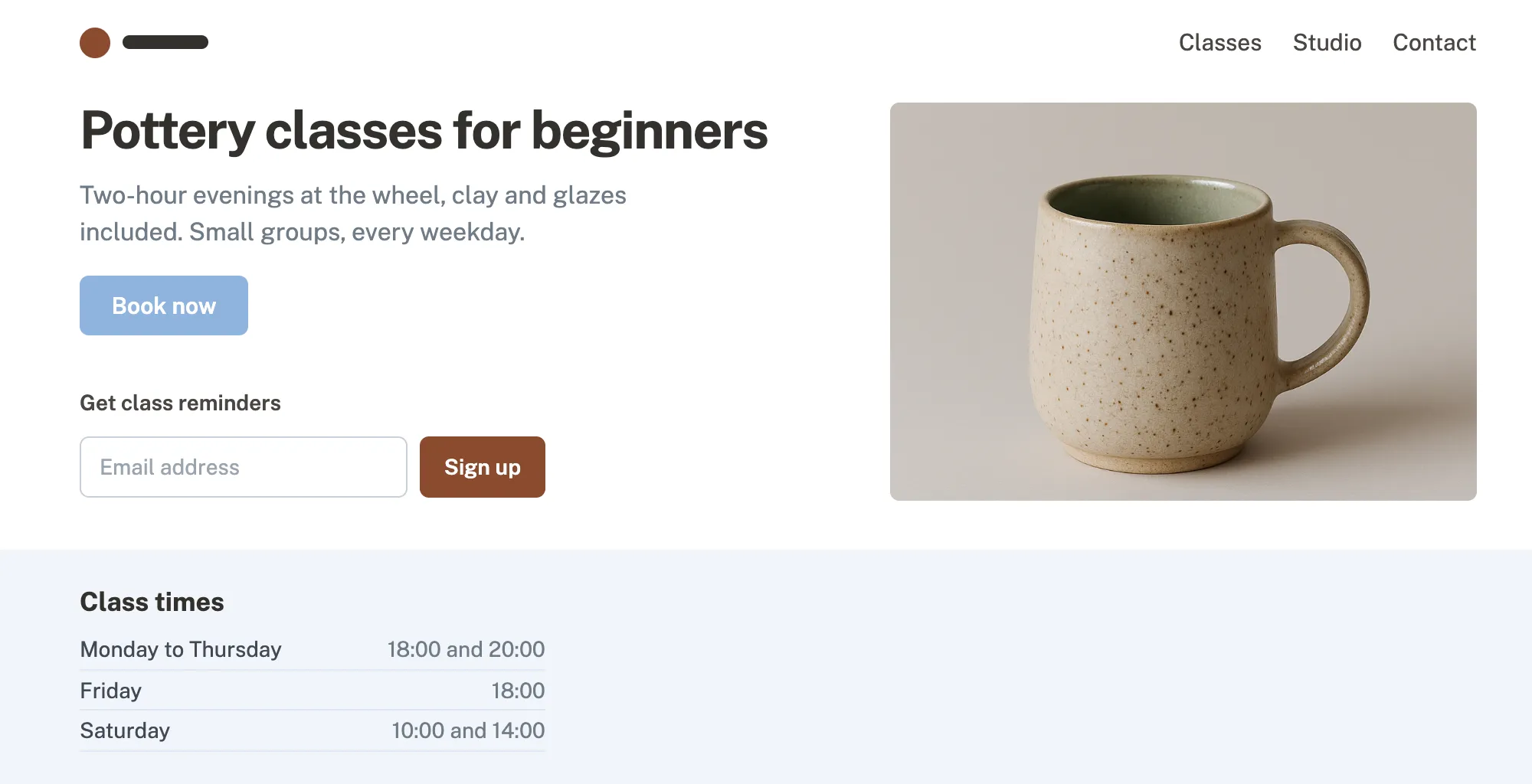
Button text is too faint WCAG 1.4.3
White on light blue has a contrast of 2.15:1. Text needs at least 4.5:1 to be readable for people with low vision.
Fix background: #1F3B6E; 2.15:1 → 11:1
Photo has no description WCAG 1.1.1
Screen reader users hear nothing for this image.
Fix alt="A speckled stoneware mug, glazed green inside"
Email field has no label WCAG 3.3.2
The field only has placeholder text, which disappears once someone starts typing and is not read as a name.
Fix <label for="email">Email address</label>
Grey text is too faint WCAG 1.4.3
Light grey on white has a contrast of 4.3:1, just under the 4.5:1 minimum.
Fix color: #525C66; 4.3:1 → 6.8:1
6 more in the report, each with its fix.
How it works
-
Paste an address
Any public page. The first audit needs no account.
-
We check it in a real browser
axe-core plus our own checks across ten areas of WCAG 2.2 AA, from alt text to keyboard access.
-
You get the page marked, and a report
Every failure on a picture of the page, the fix for each, and a report you can send on.
The report
A score, what it means and what to fix first, in words anyone can follow.
- One score, and how it moved since last time
- Problems in order of what to fix first
- Where each one is on the page, and the fix
Home page 17 September 2026 · Page 1 of 3
Accessibility audit
Automated WCAG 2.2 AA checks
72/100
3 up from 69 on 9 September
- 10 problems, in 17 places
- 3 probably fail
- 2 need a person to check
What happens next
- The 10 problems get fixed first. They stop some visitors from booking or reading.
- The 3 probable failures are checked by hand, then fixed the same way.
- The audit runs again once the fixes are live, with the new score.
Problems, fix first
-
1
Booking button text below 4.5:1 contrast "Book now" button
Fix
background: #1F3B6E; 2.15:1 → 11:1 -
2
Image without a text alternative Class photo
Fix
alt="A speckled stoneware mug, glazed green inside" -
3
Form field without a label Class reminders field
Fix
<label for="email">Email address</label> -
4
Text below 4.5:1 contrast Grey paragraph under the headline
Fix
color: #525C66; 4.3:1 → 6.8:1
6 more problems over the next two pages.
Checks
Ten areas, in plain words
Each check says what a visitor would struggle with, not which clause it breaks. Every one finds what a machine can, and the report says what still needs a person.
-
Alt text
Photos and icons a screen reader can describe.
WCAG 1.1.1, 1.4.5 -
Color contrast
Text you can read in sunlight or with tired eyes.
WCAG 1.4.3, 1.4.11, 1.4.1 -
Keyboard and focus
Every button reachable without a mouse, and you can see where you are.
WCAG 2.1.1, 2.1.2, 2.4.3, 2.4.7, 2.4.11 -
Form labels
Each field says what goes in it, and errors say how to fix them.
WCAG 3.3.2, 1.3.1, 1.3.5, 4.1.2 -
Headings and landmarks
A page outline that makes sense when read aloud.
WCAG 1.3.1, 2.4.1, 2.4.6 -
Link text
Link names that make sense out of context. No "click here".
WCAG 2.4.4 -
ARIA
Custom controls tell assistive technology what they are.
WCAG 4.1.2 -
Page language and title
The page declares its language, so it is pronounced correctly.
WCAG 3.1.1, 3.1.2, 2.4.2 -
Data tables
Tables that read each cell with its headers.
WCAG 1.3.1 -
Target size
Buttons and links big enough to tap on a phone.
WCAG 2.5.8
Monitoring
See when a page gets worse
Add the pages people rely on, like booking and contact, and rescan them daily, weekly or monthly. How monitoring works
9 September, score fell to 69. A new booking widget added 4 failures. Email sent to you the same morning.
Fixes
Every problem comes with its fix
Hand it to whoever built the site. No automated check proves a page passes, so our list of checks says which ones need a person.

Before · a screen reader says
“mug-hero-04.jpg, image”
After
“A speckled stoneware mug, glazed green inside, image”
pages/classes.html- <img src="mug-hero-04.jpg">+ <img src="mug-hero-04.jpg" alt="A speckled stoneware mug, glazed green inside">Deadlines
Know where you stand before the next deadline
The European Accessibility Act already applies. The US rules for public bodies and health care follow in 2027 and 2028, and ask for WCAG 2.1 AA. The audit checks WCAG 2.2 AA, which covers it.
-
28 June 2025 · passed
European Accessibility Act
Anyone selling covered products or services to consumers in the EU, including online shops.
-
26 April 2027 · 6 months left
ADA Title II, larger public bodies
US state and local governments, public schools and universities serving 50,000 people or more.
-
11 May 2027 · 6 months left
Section 504 web rule
Hospitals, clinics and others with US health funding and 15 or more employees.
-
26 April 2028 · 18 months left
ADA Title II, smaller public bodies
US state and local governments under 50,000 people, and special district governments.
Built for the people who have to explain it
-
Agencies
Send the report under your own name
Audit every client site from one account. Your logo on the PDF, our checks behind it.
For agencies → -
Shopify stores
Know if your theme is the problem
Checks the storefront and product pages your customers actually use, against the bar the European Accessibility Act sets.
For Shopify stores → -
Public bodies
Show progress before the Title II date
Monitor every public page monthly and keep a dated record of scores for the file.
Laws and deadlines →
Run your first audit
Paste any public page. You get the marked-up picture and the report in about a minute.
Free, no account needed. An account adds 10 pages, free for good.